
2026 Updates Are Here

Updated: Jan 9
*Updated Friday, January 9, 2026
Platform Updates Friday, January 9, 2026
Bug Fixes and Improvements
This next update focuses on stability, clarity, and smoother day-to-day use. Nothing flashy. Just things working the way they should.
Your Work Stays Updated
We fixed an issue where threads, documents, and folders weren't always showing your latest changes. Now when you make updates, you'll see them immediately without needing to refresh.
Smoother Scrolling
When you send a message, the screen now scrolls to show Sophia's response right away instead of jumping to the bottom of the conversation.
Cleaner Interface
The thread list no longer overlaps the logo, so navigation feels less cluttered.
Staying Logged In
Fixed an issue that was logging users out too often.
Verification Codes Are Clearer
When you request a verification code, the system now tells you whether it's being sent to your email or phone, so you know where to look.
Better File Parsing
We also increased processing time for longer documents, so uploads with 100+ pages won't time out.
Assessment Updates
We've updated our internal references for the DAS-II and WISC-V to improve accuracy when working with these assessments.
Recommendation Generator Fix
Fixed an issue where the Recommendation Generator could cause display problems.
TLDR; Overview of Major Updates
Here are the biggest updates you will see in the platform
Chat + Studio Writer is now one singular interface
File folder organization
Multi-PDF upload
Upload different file types (PDF, PNG, JPEG, CSV, .DOCX, HTML)
Bell curves, charts, graphs, and tables are built into the Studio Writer
Preset templates available
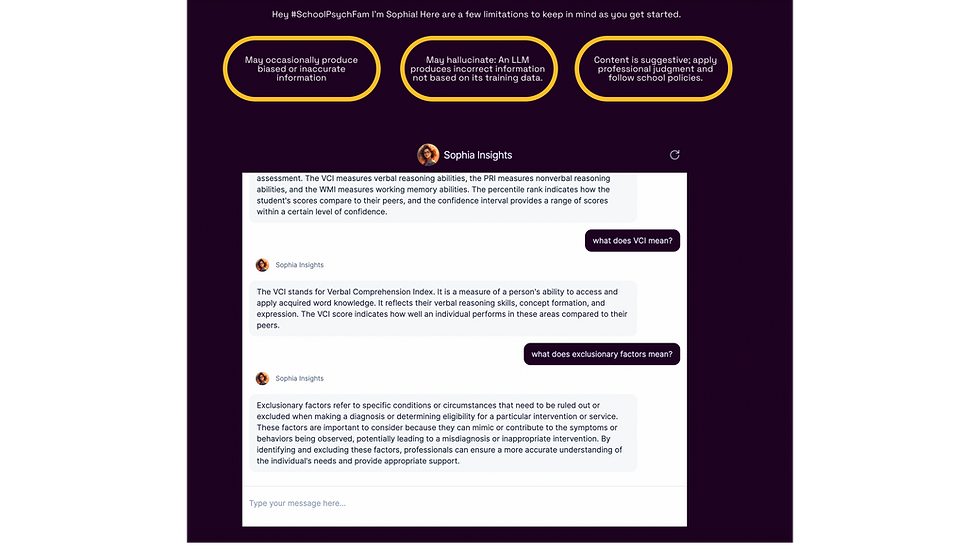
Higher accuracy (less hallucinations)
Personalization (add your own custom instructions for Sophia)
We’ve merged Chat and Studio Writer into one unified interface. Now you can talk through your thinking with Sophia, iterate, and then when ready, click "Add to Document” or “Create Document” and then add it directly to your document with one click.
What This Looks Like in Practice
You're writing a psychological evaluation. You ask Sophia for help analyzing scores from a recent WJ-V. She gives you a draft. You say, "Make the language more parent-friendly." She revises. You say, "Now connect this to the classroom observations." She does.
When it reads the way you want, you click one button, and it’s added straight to your doc!
Then you keep going, same conversation, same document, same workspace.
Detailed Breakdown of What's New
Upload Multiple PDFs at Once
This has been one of our most requested features for a long time. You can now upload multiple PDF files in a single action, both in conversations and when using tools. No more uploading one file at a time. No more waiting between each upload. Select your files and go.
Bell Curves Are Here
You asked for this one constantly, and we heard you. Bell curve visualizations are now built directly into the editor. You can create them right inside your reports without needing external tools or image workarounds. Bar charts and line graphs are also available for those moments when a visual tells the story better than text.
A very cool feature of the bell curve feature is that you can paste in your scores and then generate a bell curve!
Organization That Makes Sense
We rebuilt how your work is organized based on how school psychologists actually think about their cases. Instead of scattered threads, you now have folders and documents (think Google Docs). Each evaluation can live in its own folder with all related documents in one place. Your evaluations, notes, and reports stay together, so you don't have to hunt through separate areas of the platform.
Real Formatting Tools
Line spacing options (single, 1.5, double). Subscripts and superscripts that actually work. Text highlighting. Color coding. Full control over fonts, sizes, alignment, and indentation. These are the tools you need to create professional reports, and now they're all built in.
Templates You Can Make Your Own
You can now upload, edit, and favorite your own templates. If your district has a specific report format, bring it in. If you've built a structure that works for you, save it. Templates are no longer static resources you choose from. They're tools you can customize and build on.
Favorite the Things You Use Most
Stop hunting for what you need. You can now favorite templates, folders, documents, threads, saved prompts, and tools. Your most-used resources stay within reach.
Personalization That Remembers How You Work
Two new features help Sophia work the way you work. Custom Instructions let you set preferences that apply across your sessions, so you don't have to repeat yourself every time. Memories allow Sophia to recall relevant context from previous conversations, making her responses sharper and more aligned with how you actually practice.
Student Demographics Built Into Folders
As you upload student information into a folder, School Psych AI will now generate demographics that you can use directly within Studio Writer. No more re-entering the same information across documents.
Create and Add to Documents Directly from Chat
You can now create a new document straight from a conversation with Sophia. You can also add content to an existing document without leaving the chat. Ask Sophia to write something, review it, and send it to your report in one flow.
Studio Writer: Now Works As a Deeper Writing Environment
Studio Writer has been rebuilt to feel familiar if you use Google Docs or Word, while keeping the practitioner focus that makes School Psych AI useful for your specific work.
Home View
Search documents and folders by name
Sort by last accessed or alphabetical order
Switch between grid and list views
Create, rename, duplicate, or delete documents and folders easily
Preview templates before you use them
Folder View
See all documents in one place
Preview documents without opening them
Copy, search, and export without breaking flow
The ability to chat with Sophia stays connected to the document you're working in
Why this matters:
Your evaluations, notes, and reports are in one organized space rather than scattered threads.
A Much More Capable Editor
The editor now supports the needs of school psychologists when writing reports.
Writing and Formatting
Line spacing options include single, 1.5, and double
Full control over fonts, size, bold, italics, underline, color, and highlights
Indentation, alignment, lists, and clear formatting tools
Tables and Visuals
Full table editing, including merging, splitting, resizing, and styling
Highlight rows, columns, or cells
Built-in charts including bar, line, and bell curves
Images can be resized and positioned directly in the document
Why this matters:
You can build clean, professional reports without exporting early or fixing formatting later.
Faster and More Stable
Behind the scenes, we refactored core systems to reduce lag and improve reliability.
What You'll Notice
Faster responses when typing or editing
Fewer delays when switching between documents
More consistent behavior across tools and chats
What This Update Means for You
Less time fixing formatting
Less time re-entering information
Fewer workflow interruptions
More confidence in what Sophia returns
This update is about making School Psych AI feel like it belongs in your workday. Not something you have to work around.
SPAI NASP Approved PDs

We're officially a NASP-approved provider (#1193).
This means every training we offer now comes with official continuing education credit that counts toward your license renewal.
Being a NASP Approved Provider means we adhere to the highest standards for PDs and trainings.
We’re excited to share our 2026 Professional Development Series! All sessions are virtual, offered live, and will be made available as recordings, so you can join us in real time or watch on your schedule.
January 16th 3:15 PM CST (90 minutes) - Shift to What’s Strong: Strength-Based Practices for School Psychologists
April 3rd 10:15 AM CST (90 minutes) - From Curiosity to Confidence: AI Foundations for School Psychologists
July 8th 1:15 PM CST (90 minutes) - Next-Level Game Plan: Advanced AI for School Psychologists
November 2nd 11:15 AM (3 hours) - Ethics at the Center: Responsible AI Use in School Psychology
All Professional Development sessions are included with the Premium Annual Membership. Be sure to register for each session to secure your spot.
Not an Annual Member? Individual sessions are available for $75 (90-minute sessions) or $125 (3-hour session). If you’re planning on more than one session this year, upgrading is the easiest (and most cost-effective) option.
Registration is now OPEN, so be sure to claim your spots! Click here to register today.
Introducing The Prompt Lab
Most frustration with AI comes down to one thing: prompting.
That is why we just released The Prompt Lab, a growing library of practical prompting playbooks and guides explicitly built for school psychologists and related service providers.
What This Does for You
The Prompt Lab helps your team use School Psych AI accurately, consistently, and efficiently for real school-based work, not examples that sound good but fall apart in practice.
Inside The Prompt Lab, Your Team Learns How to Prompt For:
Psychological evaluations
Assessment interpretation and report writing
FBAs and behavior documentation
IEP goals and present levels
Clinical notes and summaries
The Result
Less trial and error, more confidence using AI, and faster systems to make your workflow easier.
SPAI Prompt Coaches
We are also rolling out Prompt Coaches, trained practitioners who help you achieve accurate, consistent results with the platform so you feel confident using it day-to-day.
Prompt Coaches Will Help You:
Fix prompts that are producing weak or inaccurate output
Learn how Sophia's workflows are designed to work
Walk through real, de-identified cases step by step
Get answers live instead of guessing or getting stuck
This Includes:
Live office hours
Guided prompting sessions
Prompt of the Day examples tied to real roles
Updated playbooks as the platform changes
The goal is simple. Better prompting. Better results. Less frustration.
If you have ever thought, "I know this tool can do more, but I'm not getting what I need," this is for you.
Built by Listening to You
Every feature and new service in this update came from conversations directly from practitioners who use our platform everyday. We read your support tickets. You shared with us how you navigate the platform. We listened when you told us what slowed you down and what you wished worked differently.
We're Just Getting Started
This release reflects months of listening, building, and refining. But it's not the end. We'll continue improving based on what you tell us matters most. If something isn't working the way you need it to, let us know. Your feedback shapes what comes next.
Thank you for being part of this community.

Comments